
MedAire Trip Ready2.2.11 - App Store
You'll be able to see results in few seconds.
Publisher Description
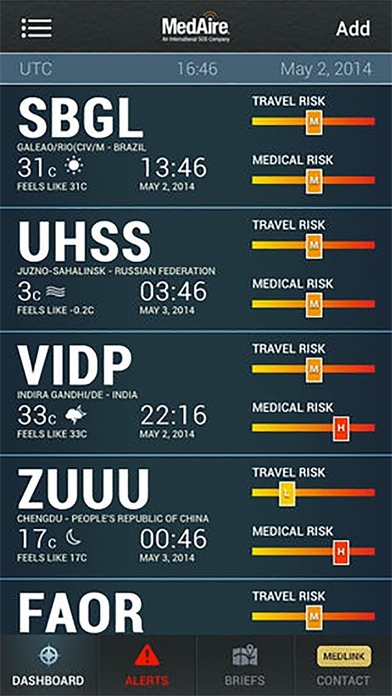
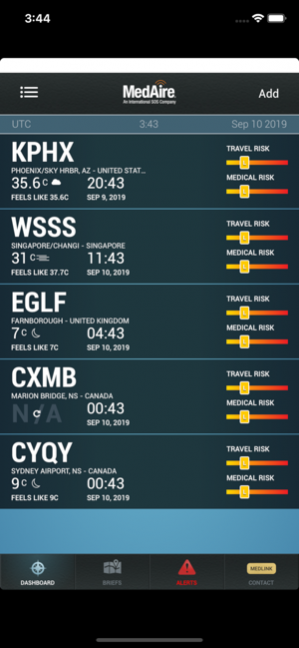

Flight planning and travel risk management just got a whole lot easier. Assess and mitigate travel and safety risks for crew and passengers on your upcoming trips.
Pilots and flight departments can see the medical and travel risk ratings, local time, current weather, and NOTAMS for each destination on their custom dashboard.
Pilots, crew and executives alike will appreciate the alert notifications when health and safety risks affect their itinerary. Users are alerted to risks like disease outbreaks, civil unrest, and natural disasters and are provided advice to stay safe.
Travel risk ratings, Aviation Travel Security Briefs and handy destination resources are available by ICAO airport code.
Risk ratings indicate the level of preparation needed by travelers prior to departure and the degree of support they may need once at their destination.
Medical Risk
Medical risk ratings provide an overview of the threats of infectious disease, hygiene and sanitation, accidents and the availability and quality of the local health infrastructure. Medical risk can be ‘Low’, ‘Medium’, ‘High’ and ‘Extreme’.
Security Risk
The travel security rating evaluates the threat posed to travelers by political violence (including terrorism, insurgency, politically motivated unrest and war), social unrest (including sectarian, communal and ethnic violence) as well as violent and petty crime.
Other factors, such as the robustness of the transport infrastructure, the state of industrial relations, the effectiveness of the security and emergency services and the country’s susceptibility to natural disasters are also considered where they are of sufficient magnitude to impact the overall risk environment for personnel. Security risk is classified as ‘Insignificant’, ‘Low’, ‘Medium’, ‘High’, and ‘Extreme’.
Aviation Travel Security Briefs provide an overview of medical and security considerations in the vicinity of the airport and may be downloaded and emailed through the app.
Local info is available by ICAO airport code, including lodging & dining options, conversion calculators (currency, distance, temperature), and a feature to add personal notes about their itinerary. A weather tab includes information on temperature, visibility, winds, METAR and TAF.
Medical resources include a quick reference checklist available to aid users with responding to medical events that occur in-flight, as well as information on the contents of the medical kits that may be onboard their aircraft.
MedAire Members have one-click access to contact information for MedLink, MedAire’s 24/7 global response center that provides in-flight and ground-based medical advice and assistance.
Medical, security and travel information is cached on a user’s iPad ensuring this vital information is accessible even without Wi-Fi.
Health & Safety Resources
• Health & Travel Risk Ratings
• Aviation Travel Security Briefs
• Medical & Travel Risk Alerts
• Medical Quick Response Guide
• Contents of Aircraft Medical Kits
• MedAire MedLink Contact information
• MedLink Call Checklist
Travel Planning Tools
• World Calendar of Events
• Vaccination Requirements
• Country Overview
• Conversion Calculators
• Entry & Exit Requirements
• Embassy Information
• Language & Currency
• Power: Wattage and Voltage
• On the go Security, Medical, and Travel Guides
Pilot Tools
• NOTAMS
• Weather, Visibility, Winds, METAR, TAF
• Aviation Travel Security Briefs
• MedLink Call Checklist
Mar 11, 2020 Version 2.2.11
This release resolves some of the login issues.
About MedAire Trip Ready
The company that develops MedAire Trip Ready is MedAire. The latest version released by its developer is 2.2.11.
To install MedAire Trip Ready on your iOS device, just click the green Continue To App button above to start the installation process. The app is listed on our website since 2020-03-11 and was downloaded 0 times. We have already checked if the download link is safe, however for your own protection we recommend that you scan the downloaded app with your antivirus. Your antivirus may detect the MedAire Trip Ready as malware if the download link is broken.
How to install MedAire Trip Ready on your iOS device:
- Click on the Continue To App button on our website. This will redirect you to the App Store.
- Once the MedAire Trip Ready is shown in the iTunes listing of your iOS device, you can start its download and installation. Tap on the GET button to the right of the app to start downloading it.
- If you are not logged-in the iOS appstore app, you'll be prompted for your your Apple ID and/or password.
- After MedAire Trip Ready is downloaded, you'll see an INSTALL button to the right. Tap on it to start the actual installation of the iOS app.
- Once installation is finished you can tap on the OPEN button to start it. Its icon will also be added to your device home screen.
Program Details
System requirements
Download information
Pricing
Version History
version 2.2.11
posted on 2020-03-11
Mar 11, 2020 Version 2.2.11
This release resolves some of the login issues.
version 2.2.11
posted on 2020-03-12
11 mars 2020 Version 2.2.11
This release resolves some of the login issues.
version 2.2.7
posted on 2020-02-27
Feb 27, 2020 Version 2.2.7
This version contains an updated FAA link for NOTAM's.
version 1.9.21
posted on 2013-09-27
version 2.2.11
posted on 1970-01-01
2020年3月11日 Version 2.2.11
This release resolves some of the login issues.
Disclaimer
Official App Store Link
We do not host MedAire Trip Ready on our servers. We did not scan it for viruses, adware, spyware or other type of malware. This app is hosted by Apple and passed their terms and conditions to be listed there. We recommend caution when installing it.
The App Store link for MedAire Trip Ready is provided to you by apps112.com without any warranties, representations or guarantees of any kind, so access it at your own risk.
If you have questions regarding this particular app contact the publisher directly. For questions about the functionalities of apps112.com contact us.
